
Free BioRender Alternative for Scientific Figure Drafting in 2026
Linda
Explore a BioRender alternative for scientific figure drafting with PubMed search, literature context, AI generation, and researcher review.
Creating a scientific figure often starts before anyone opens a design canvas.Researchers first need to decide what scientific story the figure should communicate, which biological steps matter, how evidence should be represented, and which relationships need to appear visually.Tools such as BioRender have made the design stage much easier. And in 2026, BioRender is no longer limited to manual drag-and-drop illustration: its AI tools can generate first-draft figures from prompts, while paid users can convert generated figures into editable elements. BioRender Help CenterThat changes the comparison.The useful question is no longer: “Can BioRender use AI?”It can. A better question is: “What happens before the figure is generated?”For biomedical researchers, the starting point may be a research question rather than a finished visual idea. In that situation, a workflow that connects literature retrieval, references, figure generation, and researcher review can be useful.This article looks at several BioRender alternatives, then walks through a real example using Noah AI Figure Generation to move from a colorectal cancer research prompt to PubMed retrieval and an initial scientific figure draft.
Quick Answer: Which BioRender Alternative Is Best?
There is no single best BioRender alternative for every researcher.BioRender is a strong choice when visual editing, scientific assets, and polished figure construction are the main priorities.Mind the Graph is useful for graphical abstracts, scientific illustrations, posters, and other research communication assets. Its current site provides a $0 entry option and promotes a large science-specific illustration library.BioIcons + diagrams.net is attractive when researchers want a free manual workflow using open scientific icons. BioIcons provides thousands of assets under several open licenses, while its diagrams.net extension can be used to assemble figures without registration.Noah AI fits a different stage of the process. It is useful when the starting point is biomedical research context and the goal is to move from a research question through PubMed retrieval toward a scientific figure draft.The difference is less about AI versus non-AI and more about visual-first versus research-first workflows.
BioRender Alternatives at a Glance
| Tool | Best for | Free option | Key difference |
|---|---|---|---|
| Noah AI | Research-to-figure drafting | 300 coins plan | PubMed retrieval + AI figure workflow |
| BioRender | Scientific design and editing | Free Basic plan | Scientific assets + editable AI figures |
| Mind the Graph | Graphical abstracts and illustrations | Free option | Science-specific visual library |
| BioIcons + diagrams.net | Free manual figure building | Free | Open scientific icons + manual assembly |
Noah currently offers a $0 Basic plan with 300 signup credits. BioRender also maintains a free Basic plan with usage limits. For a broader tool comparison, see The 10 Best Scientific Figure Creation Tools in 2026.
How Noah AI Supports Scientific Figure Drafting
Noah AI provides a dedicated Figure Generation Assistant for Life Sciences.The workspace allows researchers to begin with a text prompt or reference image/file and provides controls for image quality and content density.Rather than beginning with individual icons, researchers can start by explaining the biological process or scientific message they want to visualize.
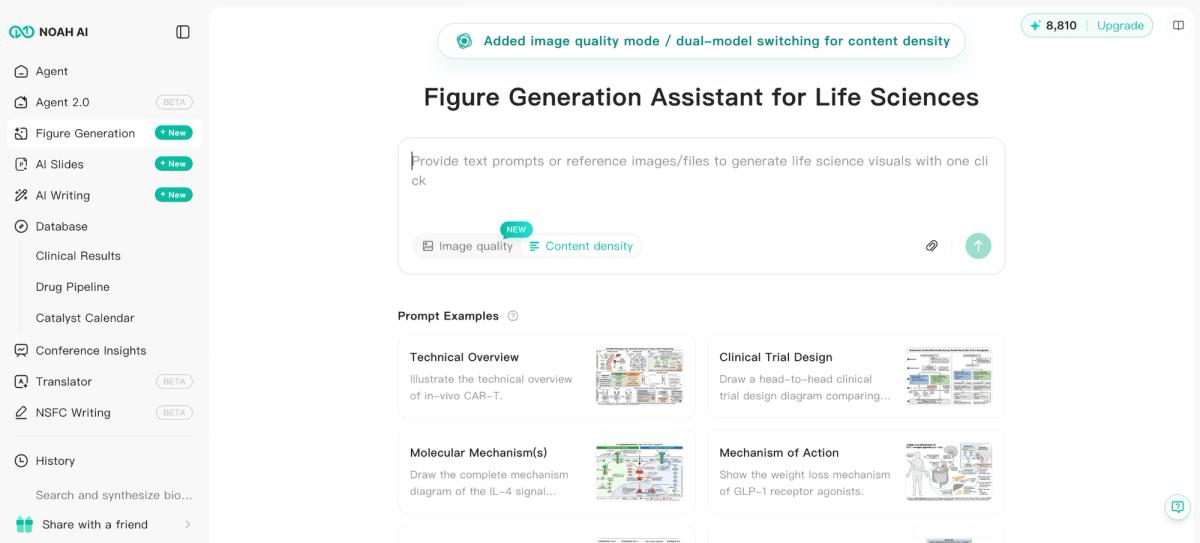
This workflow is particularly relevant when the challenge is not simply drawing the figure, but deciding how biomedical information should be translated into a visual structure.For a broader guide to figure planning, see How to Create Effective Scientific Figures for Research.
Step 1: Describe the Scientific Figure You Need
To test the workflow, we used a real biomedical example: circulating tumor DNA, or ctDNA, for colorectal cancer recurrence monitoring.“Create a clean scientific figure draft showing how circulating tumor DNA (ctDNA) can be used for colorectal cancer recurrence monitoring. Include tumor cells, blood sample collection, ctDNA fragments, sequencing analysis, and recurrence risk interpretation. Use a clear biomedical illustration style suitable for a research presentation.”
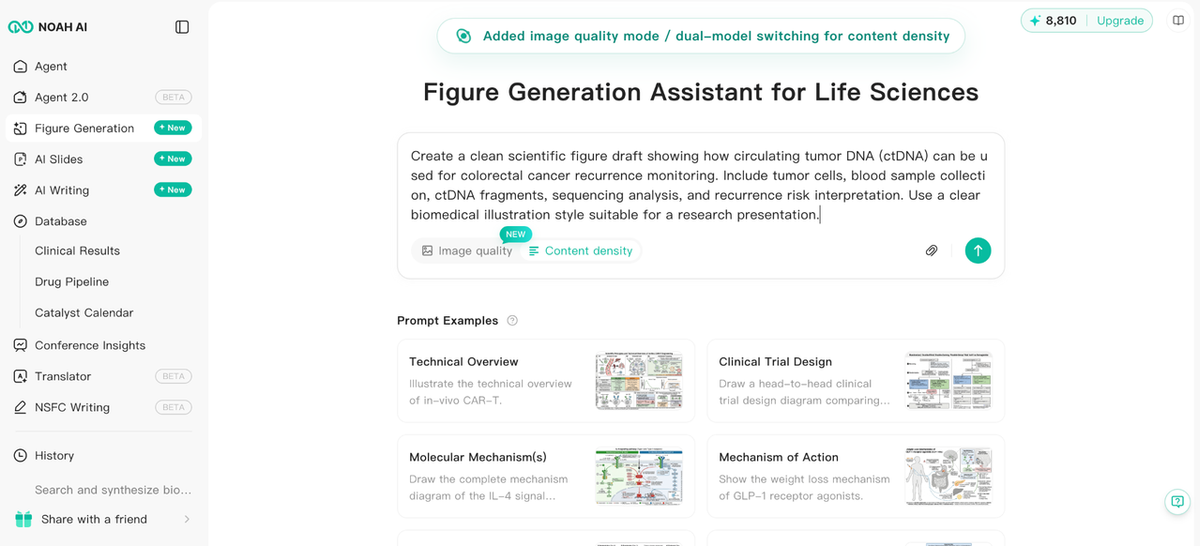
The prompt includes more than a topic. It defines the disease context, biomarker, biological source, sample collection, sequencing analysis, clinical interpretation, and intended presentation style.That level of specificity matters. A prompt such as “create a colorectal cancer figure” gives the system very little structure. A better prompt explains what process should be shown and how the components relate to one another.For researchers using other AI tools, the same principle applies: the quality of the first draft depends partly on how clearly the scientific objective is defined.
Step 2: Retrieve Biomedical Literature Before the Figure
This is where the Noah workflow becomes more relevant to biomedical research.After the ctDNA prompt was submitted, the interface displayed Thinking and Information Retrieval. The workflow showed PubMed Search, Image Generation, Search Summary, PubMed Search Term, and Search Results.
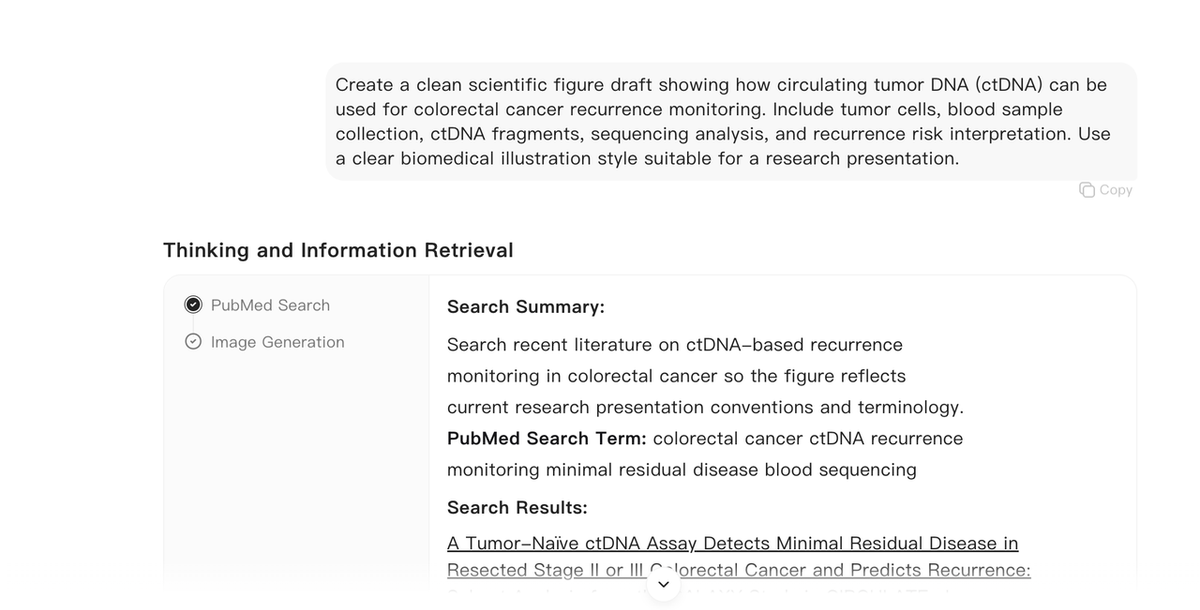
The process becomes research question → literature retrieval → scientific context → figure draft, rather than simply prompt → image.Noah also supports broader PubMed-based biomedical research workflows outside figure generation. Researchers who want to understand that process in more detail can read PubMed Search with AI.This does not mean that searching PubMed guarantees that an AI-generated figure is scientifically correct. It means the researcher has additional source context available during the workflow. That distinction matters.
Why Literature Context Matters for Scientific Figures
A visually convincing scientific figure can still be scientifically wrong.
- Incorrect biological relationships
- Missing experimental steps
- Misleading arrows
- Inappropriate terminology
- Unsupported clinical interpretations
- Oversimplified mechanisms
This is especially important in biomedical research, where a single arrow can imply causality and a short label can change the meaning of a pathway.Literature retrieval can help researchers check the information surrounding the figure, but it does not remove the need for expert judgment. Researchers should still inspect the original papers and verify whether the figure accurately represents the evidence.For a broader source-verification workflow, see How to Find Sources for a Research Paper with AI.
Step 3: Generate the Scientific Figure Draft
After the retrieval step, Noah generated a visual draft showing the ctDNA monitoring workflow.The output attempts to connect several stages: colorectal tumor → ctDNA shedding → blood collection → plasma and DNA analysis → sequencing → variant detection → clinical interpretation → longitudinal monitoring.
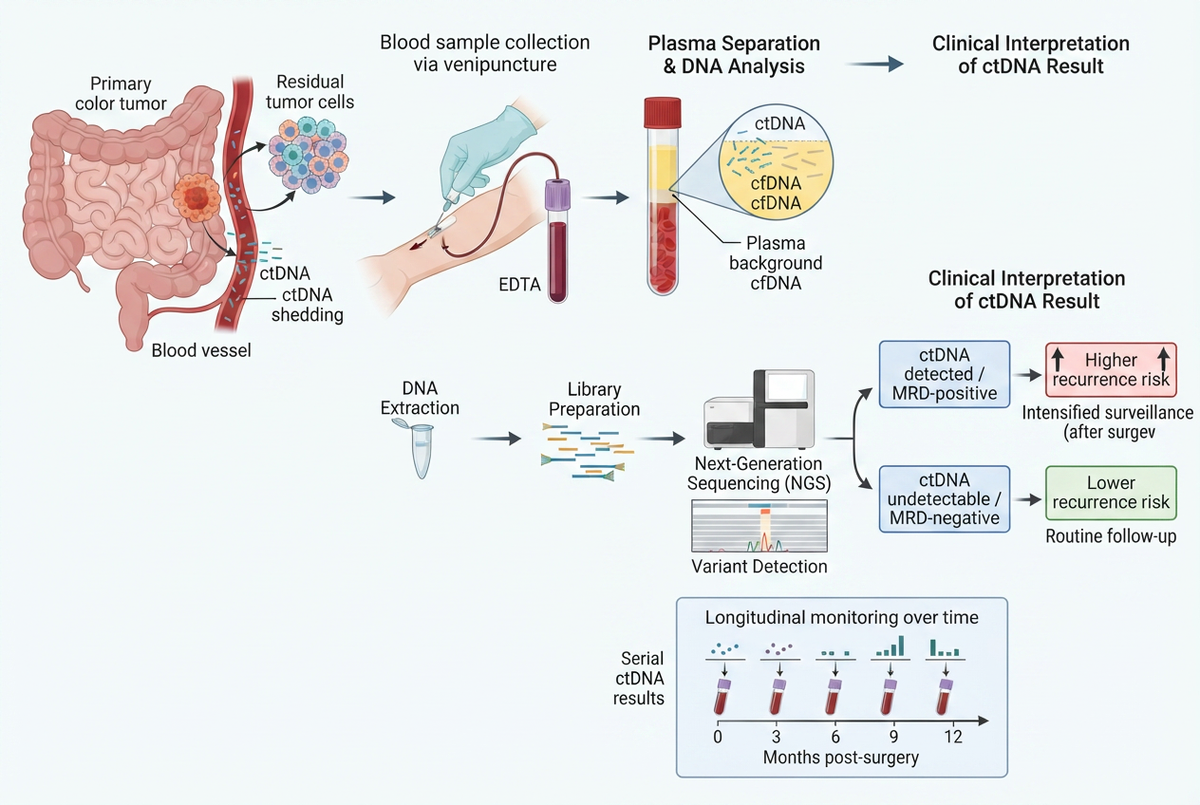
The main value here is the first-draft stage. Instead of designing every element individually before seeing the complete composition, a researcher can quickly evaluate a proposed visual structure.
- Is the scientific flow correct?
- Are important steps missing?
- Are the labels accurate?
- Are arrows communicating the right relationship?
- Is the visual hierarchy clear?
- Does the interpretation match the evidence?
This is also why an AI-generated figure should be treated as a draft, not as a finished scientific asset.
Researcher Review Is Still Required
AI-generated scientific figures can contain inaccurate labels, awkward text, incorrect relationships, or other visual artifacts.Researchers should therefore verify the output before using it in a paper, poster, slide deck, report, or other scientific communication.
- Verify biological terminology.
- Check every directional arrow.
- Confirm the order of experimental or clinical steps.
- Review abbreviations and labels.
- Check whether conclusions are stronger than the underlying evidence.
- Compare the figure against the original references.
- Refine or recreate visual elements when necessary.
AI helps draft → researcher reviews → researcher refines before use.Noah should not be treated as a replacement for scientific review.
Noah AI vs BioRender: The Real Difference in 2026
Older comparisons often described BioRender as a manual design tool and AI figure generators as the automated alternative. That is no longer accurate.BioRender now supports AI-generated custom figures and editable AI figures, alongside its existing scientific illustration and editing environment. BioRender Help CenterThe more useful comparison is therefore about the workflow around the figure.
Use BioRender when:
- You already know what the figure should communicate.
- Detailed visual editing is important.
- You want a large scientific asset library.
- You need to manually adjust icons, arrows, text, and layout.
- Visual refinement is the main bottleneck.
Use Noah AI when:
- You are starting from a biomedical research question.
- Literature context is part of the figure-development process.
- You want to move from PubMed retrieval toward a first scientific visual draft.
- Translating research content into an initial visual structure is the main bottleneck.
The tools can also complement one another. A researcher could use Noah to explore the research-to-draft stage and then use a dedicated design environment when detailed visual polishing is required.If your primary goal is to compare a larger range of BioRender competitors, see Best Free BioRender Alternatives for Scientific Figures.
Other BioRender Alternatives Worth Considering
Mind the Graph
Mind the Graph focuses on scientific figures, graphical abstracts, infographics, and research communication. It may be a better fit when the main requirement is graphical abstract design, scientific illustrations, research posters, or template-based visual communication.Compared with Noah’s workflow, Mind the Graph is more centered on creating and assembling the visual itself than on connecting PubMed retrieval directly with figure drafting.
BioIcons + diagrams.net
BioIcons takes a different approach. It provides thousands of scientific icons with open licensing options, and its diagrams.net extension lets researchers assemble figures manually, add text and shapes, and export the result.This combination is particularly useful when software cost is a major constraint, the researcher is comfortable building diagrams manually, open scientific assets are sufficient, or AI generation is unnecessary. The trade-off is that researchers need to plan and assemble the complete visual structure themselves.
A Practical Research-to-Figure Workflow
- Define the scientific question
Identify exactly what the figure should explain.
- Retrieve relevant evidence
Search PubMed and other appropriate biomedical sources to understand the current evidence and terminology.
- Draft the visual structure
Use an AI scientific figure tool or another drafting method to translate the research context into an initial figure.
- Review the science
Verify every label, relationship, step, and interpretation against reliable sources.
- Refine the design
Adjust visual hierarchy, spacing, labels, colors, icons, and publication-specific requirements using the most appropriate design environment.The important point is that scientific reasoning and visual design are related but different tasks. A good workflow should support both.
FAQ
Is there a free BioRender alternative?
Yes, but the best option depends on the workflow. BioIcons with diagrams.net offers a free manual figure-building workflow. Mind the Graph currently has a free entry option. Noah AI has a $0 Basic plan with 300 signup credits, while BioRender itself also offers a free Basic plan with limits. Researchers should check current licensing and export terms before using any platform for publication or commercial work.
Does BioRender have AI figure generation?
Yes. BioRender currently provides AI-assisted custom figure generation and editable AI figures. This is why 2026 comparisons should not describe BioRender as a manual-only tool.
Can AI generate scientific figures from text?
Yes. AI tools can convert text descriptions into visual drafts, but generated figures should not automatically be assumed to be scientifically accurate or publication-ready. Researchers need to verify terminology, relationships, evidence, and final presentation requirements.
Can Noah AI search PubMed during scientific figure generation?
In the tested ctDNA workflow, Noah displayed a PubMed Search step alongside Search Summary, PubMed Search Term, Search Results, and Image Generation. This allows researchers to review biomedical literature context as part of the figure-generation workflow. It should not be interpreted as a guarantee that the final generated image is scientifically correct.
Is Noah AI better than BioRender?
Not universally. BioRender is a stronger fit when researchers want detailed visual editing, scientific assets, and control over final figure design. Noah is more relevant when the workflow begins with biomedical research context and the user wants to move through literature retrieval toward an initial scientific figure draft. The right choice depends on which stage is slowing down the research workflow.
Final Takeaway
BioRender alternatives should not be compared only by asking which platform has the most icons or which one can generate an image from a prompt.In 2026, BioRender itself already includes AI-assisted figure generation. The more useful question is: What workflow connects the research question to the first reliable visual draft?For researchers who already know exactly what they want to draw, BioRender, Mind the Graph, or an open icon-based workflow may provide the visual control they need.For researchers starting from biomedical evidence, Noah AI offers a different path: biomedical research question → PubMed retrieval → scientific context → figure generation → researcher review.That workflow does not replace scientific judgment. It provides a faster starting point for turning complex biomedical research into a visual draft that researchers can inspect, verify, and refine.Explore Noah AI’s Figure Generation workflow and start with a biomedical research question.