Similar Products to BioRender for Scientific Figure Revision and Iteration
Linda
Compare products similar to BioRender for revising scientific figures, with a real Noah AI prompt, PubMed evidence dataset, and revised result.
The best product similar to BioRender for scientific figure revision depends on what must change. Noah AI is the strongest option in this comparison when a researcher wants to revise the scientific story in natural language while keeping the work connected to biomedical evidence. Adobe Illustrator is better for exact vector corrections, Figma for collaborative review and recoverable versions, Inkscape for free vector editing, PowerPoint plus Bioicons for slide-native handoff, and Mind the Graph for manual replacement of scientific assets.The real task is not “make another scientific image.” It is to turn a promising first draft into a scientifically corrected, visually clearer, traceable final figure without losing the strongest parts of the previous version. That requires more than a regenerate button: researchers need a revision brief, version selection, scientific QA, and a finishing tool when exact text or geometry matters.
Disclosure: Noah AI is our product. We used a real Noah task and report both the improvements and the remaining errors. Competitor positioning is based on current official product information rather than deep hands-on testing of every platform.
Quick comparison
| Tool | Best revision use | Type of control | Version workflow | Main limitation |
|---|---|---|---|---|
| Noah AI | Scientific and narrative revision from written feedback | Natural-language changes to content, hierarchy, labels, and composition | Each generated result can be reviewed and compared | Exact character-level changes can still fail |
| Adobe Illustrator | Final vector correction and production | Precise control over paths, layers, typography, and exports | Manual file/version discipline | High learning curve; no biomedical evidence check |
| Figma | Collaborative figure review | Layer editing, comments, shared files, and version history | Named versions can be viewed, restored, duplicated, and shared | Scientific accuracy remains the team's responsibility |
| Inkscape | Free SVG revision | Detailed vector and text editing | Manual file/version discipline | Less convenient for evidence-led generation or team review |
| PowerPoint + Bioicons | Fast slide-native edits and lab handoff | Shapes, text, colors, SVGs, and slide layout | Familiar copies and presentation files | Complex figures become manually intensive |
| Mind the Graph | Asset replacement and manual scientific layout | Drag-and-drop scientific editor and editable illustrations | Project-based manual iteration | Evidence and claim control happen outside the canvas |
What “scientific figure revision” actually includes
Researchers often treat revision as a visual cleanup step. In practice, a figure can require four different kinds of change:
- Scientific correction: add a missing cell type, remove an unsupported mechanism, change an activation arrow to inhibition, or distinguish a conceptual objective from an observed result.
- Narrative correction: change the reading order, reduce five competing messages to one, or move supporting detail into callouts.
- Visual correction: remove duplicated labels, improve spacing, increase contrast, standardize colors, or make text readable at the intended size.
- Production correction: fix exact wording, special characters, line weights, dimensions, and export format.
No single tool is automatically best at all four. AI generation is useful for broad scientific and narrative changes. A vector editor is safer for exact production corrections. Collaborative design software is strongest when several reviewers must comment, compare, and approve versions.This is the real user question behind the search: Which BioRender-like product can make the kinds of revisions my figure needs without forcing me to rebuild it from scratch?
How we evaluated the alternatives
We used six criteria tied to the final artifact:
- Scientific editability: Can the researcher describe a biological correction, not just move objects?
- Local versus global control: Can the tool preserve the composition while changing a specific label, and can it also restructure the whole story when needed?
- Iteration speed: How much manual rebuilding is required between versions?
- Version traceability: Can a team retain, compare, name, restore, or share earlier states?
- Collaboration: Can domain experts give feedback without taking over the design file?
- Finishing control: Can the final wording, typography, geometry, and export be corrected exactly?
Noah AI: best for natural-language scientific revision
Noah AI is most useful when feedback is expressed as scientific instructions: “restore Treg,” “show this relationship as context-dependent,” “remove the duplicated hyaluronan label,” or “preserve the three-panel structure but simplify the mechanism panel.” The researcher can keep the review inside an iterative, human-in-the-loop workflow instead of translating every correction into manual drawing operations.Noah’s scientific-figure workflow also supports prompts, reference materials, PubMed retrieval, figure interpretation, output, and cited references. Its official figure page presents iterative refinement as a core use case. The important conversion point is not that Noah can redraw an image; it is that a subject-matter expert can turn a review memo into a new candidate version quickly.
Real case: prompt → evidence data → revised result
We used a completed Noah task to revise a presentation-scale figure titled “Overcoming T-Cell Exclusion in Pancreatic Ductal Adenocarcinoma.” The first draft had a useful three-panel composition, but it was not ready to publish or present: the subtitle contained a typo, hyaluronan appeared twice, Treg was missing, the cDC1 cross-presentation label was incomplete, callout numbering was inconsistent, and the requested line-style legend was absent.
Prompt: turn review comments into testable instructions
Instead of asking Noah to “make it better,” we converted each defect into a constrained revision prompt. It told Noah to preserve the strongest parts of the 16:9 composition while applying exact changes:
- remove the incorrect subtitle;
- show collagen-rich desmoplastic stroma, hyaluronan, hypoxia/HIF-1α, abnormal vasculature, TAM, MDSC, and Treg exactly once where appropriate;
- retain exactly five exclusion mechanisms with specified labels and one-to-one numbered markers;
- add the tag “Conceptual research objective” to the desired immune-transition panel;
- replace two generic recruitment labels with one “Effector-cell entry” label;
- add one compact legend defining solid arrows, blunt-ended lines, and dashed arrows;
- preserve the evidence strip and avoid new clinical claims.
This makes the next version auditable. “Improve the figure” is subjective; “restore Treg, remove the duplicated label, keep five numbered mechanisms, and add one legend” can be checked.
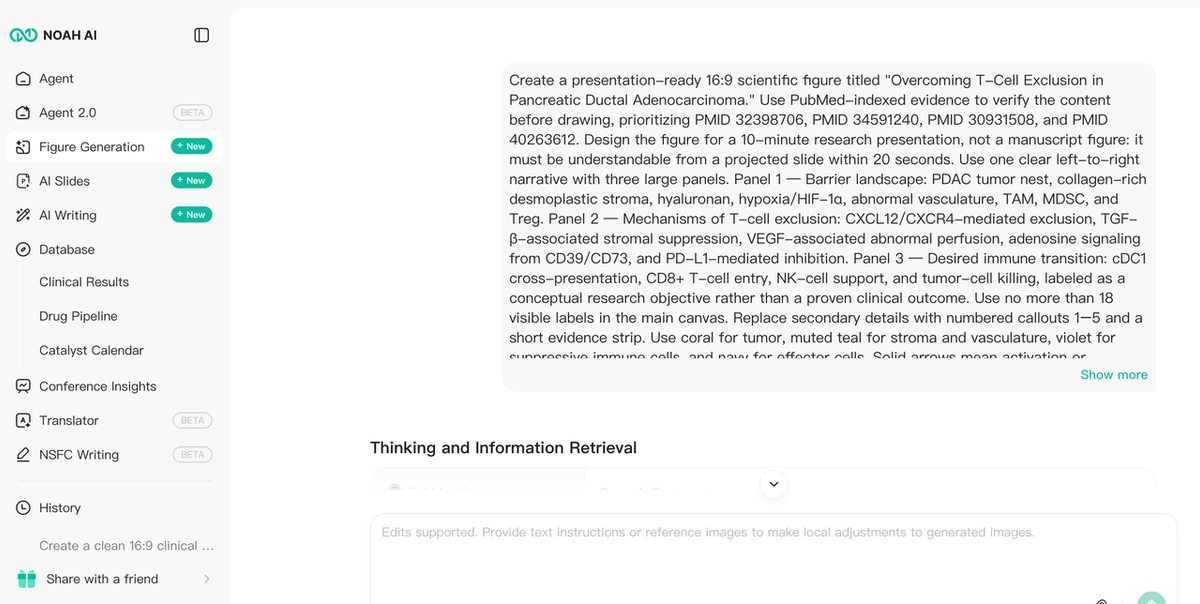
Figure 1. A human reviewer converts visible scientific and design defects into a constrained revision prompt.
Data: inspect the evidence boundary before redrawing
The figure was grounded in four prioritized PubMed records. Together, they supported the overall PDAC tumor-microenvironment framing, hypoxia as an immune barrier, and the regulatory roles of macrophages and fibroblasts. The records did not turn every requested relationship into a proven clinical claim; they defined a source set that the reviewer could inspect before accepting the schematic.
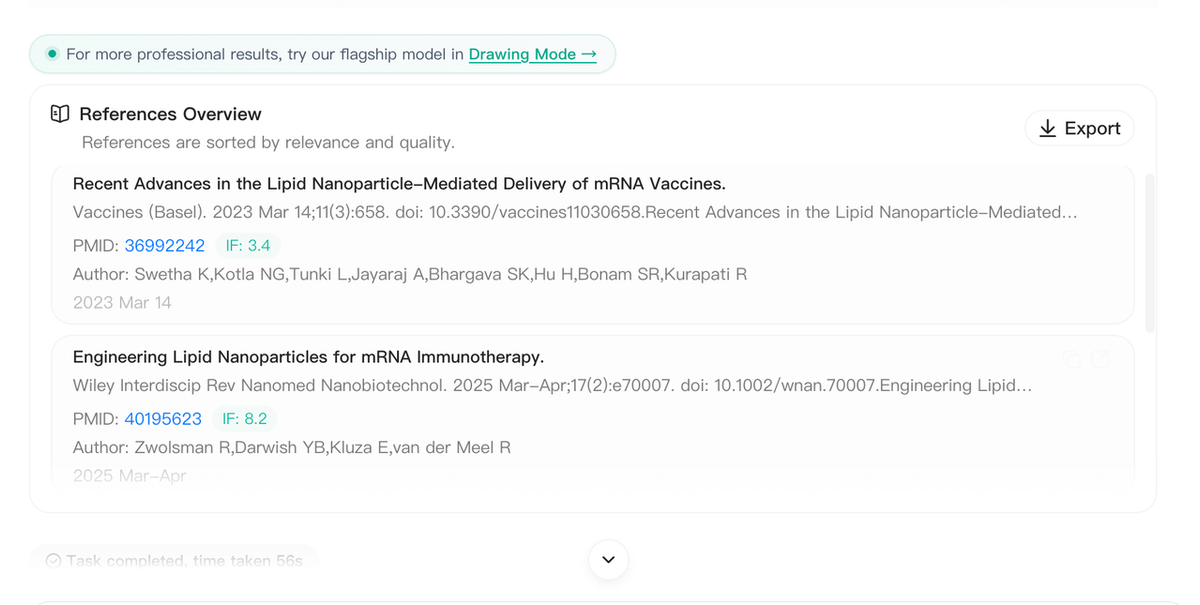
Figure 2. The evidence inspection layer links each PubMed record to the part of the revision it helps constrain.
That distinction matters in scientific figure iteration. Evidence data should set boundaries on what belongs in the image, while the prompt should separately label conceptual objectives, proposed relationships, and prohibited claims.
Result: compare the new figure against the acceptance list
The revised output materially improved the figure. It removed the subtitle, restored Treg, deduplicated the stromal labels, organized the five mechanisms, added the conceptual-objective tag, and included a compact relationship legend. Most importantly, it preserved the strongest part of the first draft: the three-panel structure and presentation-scale visual hierarchy.We then issued a final cleanup prompt to correct the bottom takeaway, remove stray numbered markers, and retain “Effector-cell entry” exactly once. The result improved parts of the numbering and kept the desired layout, but the newest version was not perfect. The bottom line still contained an extra word, additional small numbers remained, and “Effector-cell entry” was shortened.That limitation matters. Iteration is not automatically monotonic: the latest generated version is not always the best version. Researchers should retain each candidate, compare it against the acceptance list, select the strongest base, and use an exact editor for the final copy pass.
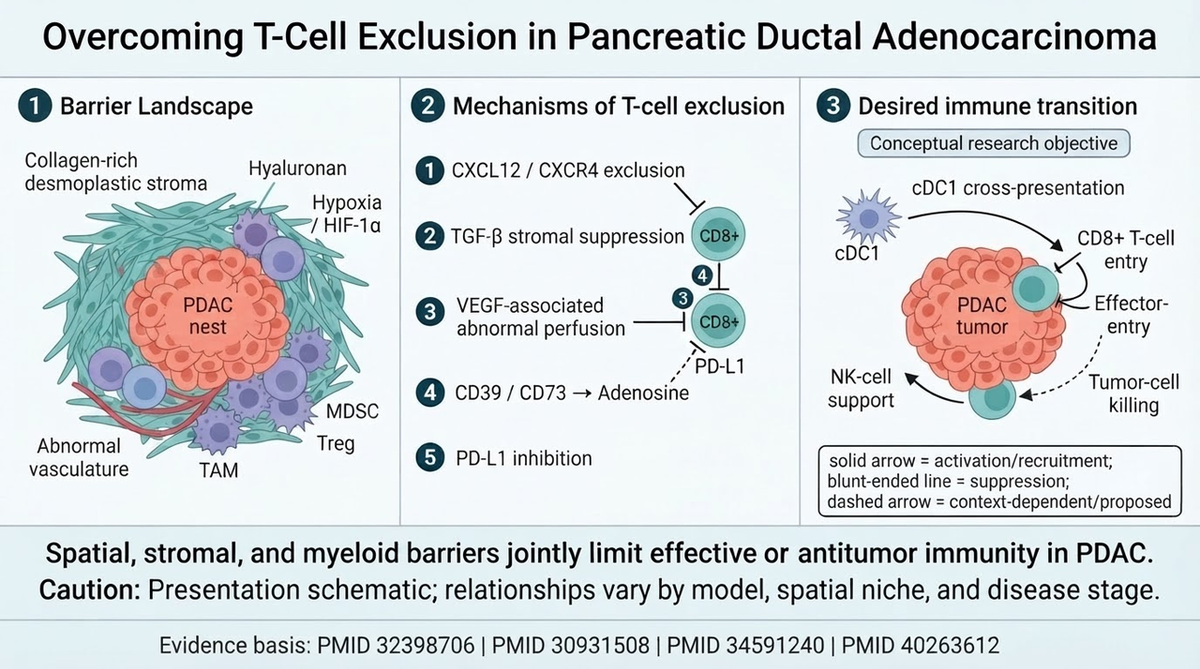
Figure 3. The revised version improves scientific completeness and hierarchy, while the remaining wording error shows why final expert QA is still required.
What the three-image case actually proves
The case supports three specific Noah advantages:
- Scientific feedback can drive revision. The researcher can request changes in biological terms rather than manually rebuilding every visual element.
- Strong structure can survive multiple passes. The three-panel narrative, aspect ratio, and color logic remained stable while scientific content changed.
- A revision can be evidence-bounded. Exact papers, prohibited claims, exact labels, and a conceptual-versus-established distinction can remain part of the instruction.
It does not prove pixel-perfect editing or autonomous publication readiness. Noah is best used for evidence-aware drafting and broad-to-medium revision. Final strings, special characters, line endpoints, and journal-specific production details still need human approval and sometimes a vector or slide editor.Choose Noah if: your bottleneck is turning scientific review comments into a materially improved figure without manually reconstructing the whole composition.
Adobe Illustrator: best for exact final corrections
Adobe Illustrator is the strongest option in this comparison for precise vector work. Adobe positions it around editable vector graphics and professional control over shapes, linework, color, and type. That makes it appropriate for the last 10% of a high-stakes figure: exact text, arrowheads, alignment, stroke consistency, masking, and scalable export.Illustrator is not a biomedical reasoning system. A designer can make an incorrect pathway look perfectly polished. The researcher must supply the approved content and review the final relationships.Choose Illustrator if: the scientific narrative is already approved and every geometric or typographic detail must be controlled exactly.
Figma: best for collaborative review and recoverable versions
Figma is useful when revision involves several people. Its official documentation states that version history lets collaborators browse a timeline, restore earlier versions, duplicate versions, share a link to a specific version, and add names and descriptions to saved milestones. A live shared file also reduces the proliferation of attachments named “final_v7_revised_FINAL.”For scientific teams, a practical workflow is to save named milestones such as “PI scientific review,” “coauthor correction,” and “journal format pass.” Comments should point to one visible problem and, when relevant, include the supporting source or exact replacement text.Figma still requires manual biological judgment and asset sourcing. It is strongest after the scientific story exists and the main need is coordinated feedback, layout editing, and version recovery.Choose Figma if: multiple reviewers need to comment on, compare, and restore figure iterations in a shared workspace.
Inkscape: best free option for SVG revision
Inkscape is a free, open-source vector graphics editor for Windows, macOS, and Linux. It uses SVG as its main format and supports technical illustration, diagramming, and multiple import and export formats.That makes Inkscape a practical finishing environment when a figure or icon library provides editable SVG. Researchers can correct text, move objects, adjust paths, change fills, and export a clean vector or raster result without a subscription.The tradeoff is workflow overhead. Evidence retrieval, scientific review, version naming, and team feedback must be organized separately.Choose Inkscape if: you need free, detailed vector corrections and are comfortable managing the scientific review and version files yourself.
PowerPoint plus Bioicons: best for fast slide-native iteration
Microsoft 365 supports inserting and editing SVG images, including resizing without quality loss and changing fills, outlines, and styles. Bioicons offers thousands of science illustrations across cell biology, immunology, anatomy, laboratory equipment, and other categories, with licenses shown per asset.This combination is effective when the final destination is a lab meeting, thesis defense, conference talk, or grant presentation. The figure remains in the presentation file, so the author can enlarge labels, align panels with the slide grid, and update the takeaway shortly before a talk.PowerPoint is less efficient for a complex mechanistic scene with many relationships. Asset licenses also vary, so each Bioicons item should be checked before publication.Choose PowerPoint plus Bioicons if: your team wants familiar, editable figures inside the slide deck used for review and presentation.
Mind the Graph: best for manual asset replacement
Mind the Graph provides a scientific drag-and-drop editor, a large illustration library, templates, and export options that include PNG, PDF, SVG, and TIFF. It is a close BioRender-style alternative for researchers who prefer to replace and rearrange domain-specific assets manually.Its revision advantage is direct visual control: the user can swap a cell, change colors, edit labels, and restructure a panel without asking a generative system to reinterpret the entire image. The limitation is that literature verification and claim control remain separate research tasks.Choose Mind the Graph if: the scientific content is already settled and the main work is manually replacing assets or refining a domain-specific layout.
Which alternative should you choose?
- Choose Noah AI for natural-language scientific and narrative revision connected to evidence.
- Choose Adobe Illustrator for exact vector and typography corrections.
- Choose Figma for multi-reviewer comments, named milestones, and recoverable versions.
- Choose Inkscape for free SVG editing.
- Choose PowerPoint plus Bioicons for slide-native edits and easy lab handoff.
- Choose Mind the Graph for manual scientific asset replacement.
A hybrid workflow is often safest: generate and restructure in Noah, review the scientific content, retain each candidate version, and finish exact text or geometry in Illustrator, Inkscape, Figma, PowerPoint, or Mind the Graph.
A revision brief that produces testable changes
Use this structure for any AI-assisted figure revision:
- Preserve: list the composition, palette, and correct labels that must not change.
- Correct: provide exact replacement strings and relationship changes.
- Remove: identify duplicates, unsupported claims, extra callouts, or visual clutter.
- Add: specify missing cells, compartments, qualifiers, legends, or evidence markers.
- Constrain: set aspect ratio, maximum label count, notation rules, and prohibited claims.
- Accept: define what a reviewer must be able to verify in the new output.
For example: “Preserve the current three-panel layout and palette. Replace label A with exact text B. Remove the duplicate mediator and all unpaired numbers. Add one Treg and one legend. Keep exactly five numbered mechanisms. Do not add therapies or clinical outcomes. The revision passes only if every label is readable and each number maps to one mechanism.”
Scientific figure iteration checklist
Before revising
- Save the current output with a version name and date.
- Separate scientific errors from design preferences.
- Identify the strongest elements that must be preserved.
- Convert vague feedback into exact labels and visible acceptance criteria.
After every iteration
- Compare the new version with the last approved version—not only with the prompt.
- Verify every label, arrow, cell type, and compartment.
- Check whether an unrelated correct element regressed.
- Inspect special characters, abbreviations, numbering, and legends at 100% zoom.
- Reject the newest version if an earlier version is scientifically stronger.
Before publishing
- Perform final copyediting in an exact editing environment when necessary.
- Match the target journal, poster, or slide dimensions.
- Export from the original asset rather than a low-resolution screenshot.
- Record evidence sources and any AI-use disclosure required by the venue.
- Remove mouse pointers, browser chrome, account details, and chat inputs from blog screenshots.
Frequently asked questions
What is the best BioRender alternative for scientific figure revision?
Noah AI is the strongest option here when revision begins with scientific written feedback. Illustrator is better for exact vector production, while Figma is better for collaborative comments and version history.
Can AI revise only one part of a scientific figure?
It can follow local-change instructions, but the rest of the image may still change. Preserve instructions, an acceptance checklist, and version comparison reduce the risk. Exact text and geometry may still require a vector editor.
Should I always use the latest generated version?
No. Generated iteration is not guaranteed to improve every element. Keep each version, compare against the scientific acceptance criteria, and select the strongest candidate rather than assuming the newest is best.
Is Inkscape a free BioRender alternative?
Inkscape is a free vector editor and is useful for editing SVG-based scientific figures. It does not provide BioRender’s curated workflow or Noah’s evidence-aware generation, so assets and scientific validation must be handled separately.
What should be checked after an AI revision?
Check exact wording, missing or duplicated labels, arrow direction and endpoint, relationship notation, numbering, special characters, figure dimensions, citations, and unsupported claims. Also confirm that correct elements from the earlier version were not lost.
Final takeaway
The closest-looking BioRender alternative is not automatically the best product for scientific figure revision. The better question is which part of the iteration remains difficult: correcting the scientific story, coordinating reviewer feedback, editing exact vector details, replacing scientific assets, or keeping the figure editable inside a presentation.The Noah PDAC case demonstrates a meaningful product advantage. Noah can turn a detailed scientific review into a new figure candidate, preserve the strongest parts of the original composition, and respond to natural-language corrections involving labels, missing cell types, mechanism hierarchy, callout logic, and relationship notation. For researchers who otherwise move manually from review notes to repeated figure reconstruction, that review-to-revision bridge is more valuable than another icon library.
Turn your next scientific figure review into a researcher-reviewable revision with Noah AI.