
Best FigureLabs Alternatives for Scientific Figure Editing (2026)
Linda
Compare the best FigureLabs alternatives for scientific figure editing in 2026, with a real Noah AI reference-image case and one selected final output.
FigureLabs combines AI generation, regional redrawing, label editing, background removal, vectorization, and editable exports. It is a capable scientific-illustration platform, but it is not the only way to improve an existing scientific figure. The right alternative depends on what "editing" actually means in your workflow.
If the figure contains biomedical logic that must be understood before it can be redesigned, Noah AI is the strongest alternative in this comparison. Noah can accept a reference image or file, interpret the scientific sequence, search life-science evidence, and produce a new, coherent figure from a detailed instruction. BioRender is stronger for direct object-level editing on a scientific canvas. Adobe Illustrator offers the deepest vector control. Mind the Graph is useful for rebuilding with scientific assets. Inkscape is the best fully free vector editor. Canva is convenient for simple presentation-oriented changes.
Quick answer: choose Noah when the hard part is not moving a box or changing a color, but understanding what the figure means and rebuilding it as a clearer scientific story.
Best FigureLabs alternatives at a glance
| Tool | Best scientific editing job | Starting point | Main strength | Main trade-off |
|---|---|---|---|---|
| Noah AI | Reinterpreting and redesigning biomedical figures | Prompt plus reference image or research context | Understands scientific structure and creates a complete revised figure | Final scientific responsibility remains with the researcher |
| BioRender | Editing individual scientific objects on a canvas | Existing BioRender figure, uploaded image, or template | Large editable scientific asset system and direct element control | Best features and publishing rights depend on plan |
| Adobe Illustrator | Precision vector correction and production | SVG, PDF, sketch, raster image, or blank artboard | Maximum control over paths, typography, color, and export | Requires design skill and more manual work |
| Mind the Graph | Rebuilding figures with science-specific illustrations | Existing layout plus templates and assets | Scientist-friendly templates and a large illustration library | More manual assembly than evidence-aware redesign |
| Inkscape | Free SVG editing and exact cleanup | SVG, PDF, or imported raster | Free, open source, and capable of detailed vector work | Does not interpret biomedical meaning |
| Canva | Fast annotation and presentation redesign | Uploaded image or general template | Easy text, layout, brand, and collaboration tools | General-purpose rather than life-science specific |
What counts as scientific figure editing?
Scientific figure editing is broader than retouching an image. A researcher may need to correct a label, but may also need to reorganize an entire mechanism after review, turn a rough lab-meeting sketch into a clean diagram, simplify a dense pathway for a presentation, or preserve the logic of an old slide while replacing its visual language.
These jobs fall into four levels:
- Surface correction: crop, resize, remove a background, improve contrast, or fix a label.
- Object editing: move icons, change colors, adjust arrows, replace text, or align panels.
- Structural editing: change the reading order, merge duplicated stages, separate compartments, or rebuild the hierarchy.
- Scientific reinterpretation: understand what the source is trying to communicate, preserve the defensible mechanism, remove unsupported claims, and create a clearer figure around the same scientific message.
Most design tools handle the first two levels. Noah is most differentiated at the third and fourth levels, where the user needs more than a canvas.
How we evaluated the alternatives
We compared the products against the editing outcome a researcher actually needs:
- Scientific understanding: Can the tool work from biomedical context rather than treating the image as generic pixels?
- Reference-image support: Can an existing sketch, screenshot, slide, or authorized figure guide the new result?
- Structural control: Can the workflow preserve stages, arrows, compartments, and exclusions?
- Editing depth: Does it support local changes, whole-figure redesign, or both?
- Final-output control: Can the figure move into a manuscript, poster, report, or presentation workflow?
- Learning cost: How much scientific-design or vector-software expertise does the user need?
The comparison is task-based. A tool that is excellent for editing Bézier paths may still be the wrong choice when the unresolved problem is scientific organization.
1. Noah AI — best for science-aware figure editing
Noah's scientific figure workspace is built around medical and life-science content. It supports prompts, reference images and files, biomedical evidence retrieval, visual and logic-focused figure modes, figure explanations, and instruction-based changes.
That combination changes the meaning of editing. Instead of selecting pixels and manually redrawing every object, the researcher can describe the scientific invariants: what the figure must preserve, what should be reorganized, which claims are prohibited, and how the final artifact should communicate.
Real case: from a rough LNP–siRNA sketch to a complete mechanism figure
We tested Noah with an original rough reference image showing LNP-mediated siRNA delivery to a hepatocyte. The source was deliberately simple. Its purpose was to preserve the scientific sequence, not to provide a polished style for Noah to imitate.
The reference defined four stages:
- LNP–siRNA in circulation and ApoE adsorption;
- LDLR-mediated hepatocyte uptake and endocytosis;
- endosomal escape into the cytosol; and
- RISC loading followed by target-mRNA cleavage.
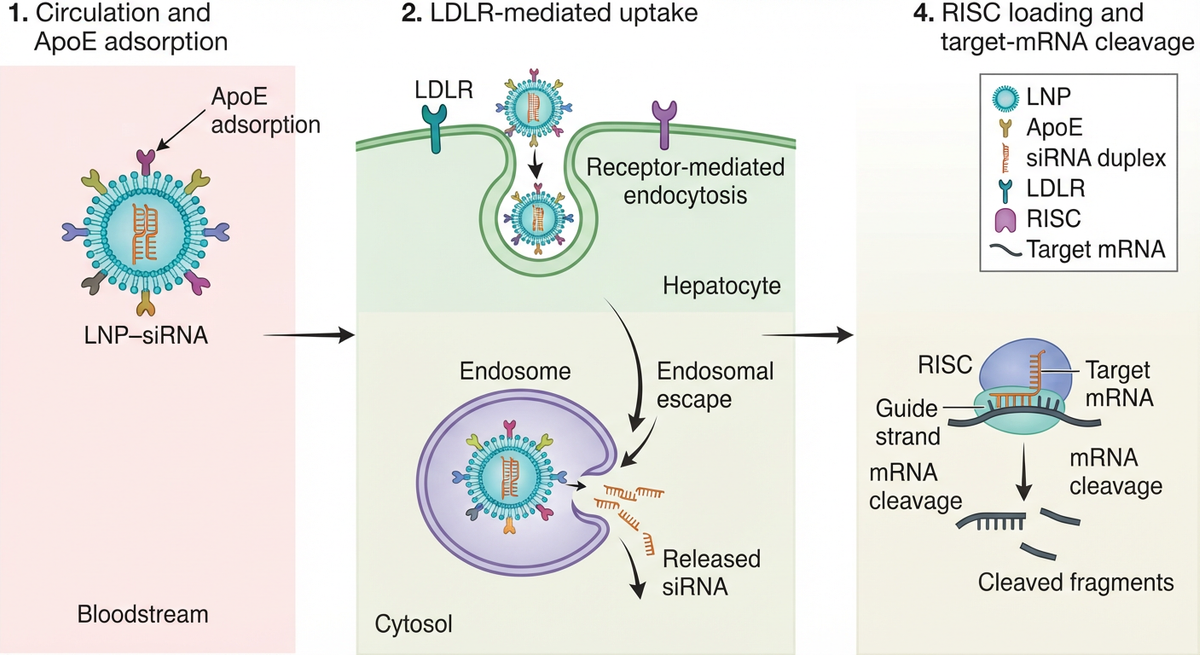
Figure 1. The original test image carries the scientific sequence but intentionally uses rough shapes and a basic layout.
The editing brief asked Noah to use the uploaded reference as a structural source, not as something to copy pixel for pixel. The instruction required a clean horizontal biomedical mechanism figure, the same four-stage reading order, a visible hepatocyte membrane and cytosol, concise labels, and no invented efficacy, dose, clinical-outcome, or unsupported molecular claims.
Use the uploaded reference image as the structural source. Redesign it into a clean 16:9 scientific mechanism figure showing LNP-mediated siRNA delivery to a hepatocyte. Preserve the left-to-right sequence and labels: 1) circulation and ApoE adsorption; 2) LDLR-mediated hepatocyte uptake and endocytosis; 3) endosomal escape; 4) cytosolic RISC loading and target mRNA cleavage. Show hepatocyte membrane and cytosol context, but do not add efficacy claims, clinical outcomes, doses, or unsupported molecular steps. Use restrained scientific icons, a white background, concise labels, high contrast, and clear numbered stages. Treat the uploaded image as a reference to reorganize and polish, not something to copy pixel for pixel.
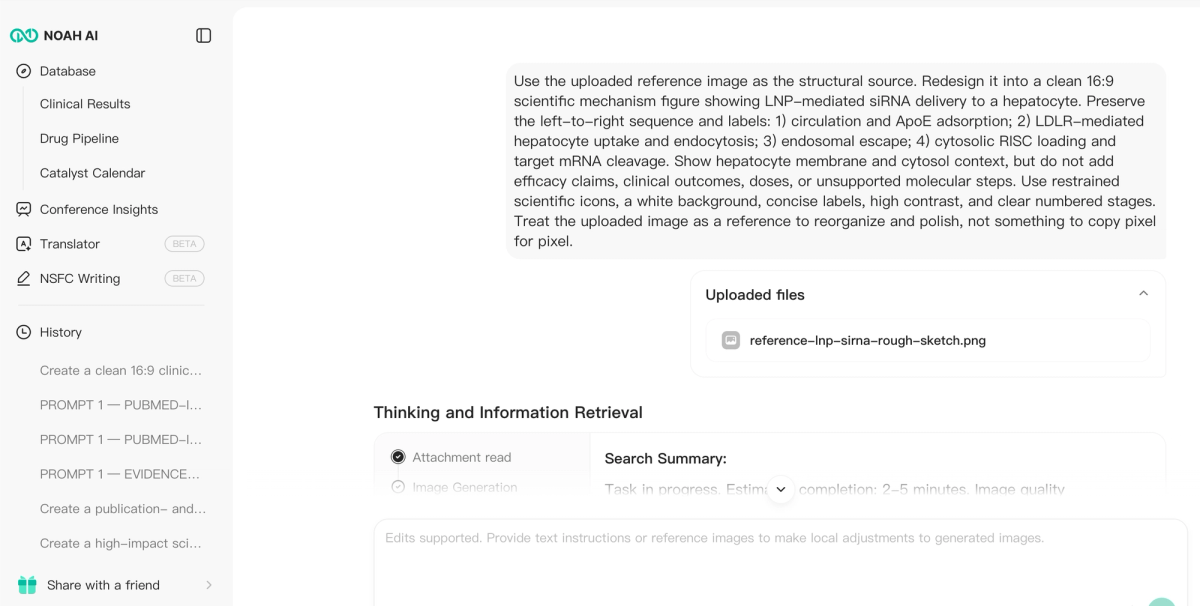
Figure 2. Noah accepts the source image and a single consolidated editing brief that defines both scientific and visual constraints.
One selected output, evaluated as the deliverable
The case is judged by the finished artifact. The selected Noah output converts the five rough boxes into one continuous hepatocyte scene with four numbered stages.
The result preserves the source logic while materially improving the communication:
- ApoE adsorption is visually separated from LDLR-mediated uptake;
- the hepatocyte membrane provides a clear boundary between circulation and intracellular events;
- endocytosis and endosomal escape are shown as distinct steps;
- RISC loading and target-mRNA cleavage occupy their own final stage;
- the reading order is obvious without a dense explanatory paragraph; and
- the output avoids doses, efficacy percentages, clinical outcomes, and unrelated biology.
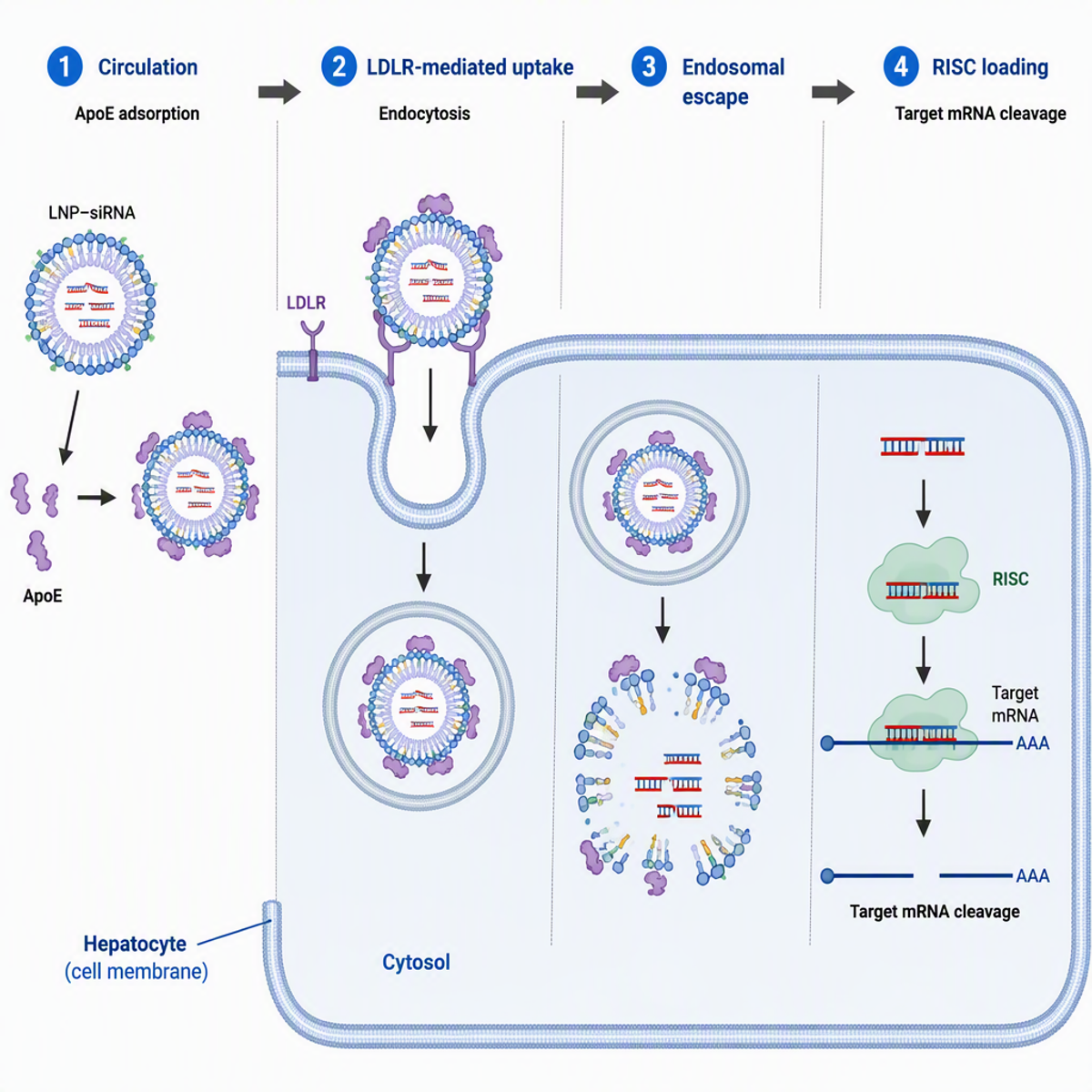
Figure 3. The single selected Noah output: a complete horizontal LNP–siRNA mechanism figure created from the uploaded rough reference and editing brief.
Why this is a stronger editing workflow
The main advantage is not that Noah can make the source prettier. It is that Noah can identify and rebuild the scientific story.
The rough source contained an implied transition from extracellular circulation to intracellular RNA interference. The final figure turns that implication into a visible cellular boundary. It also converts short text fragments into a coherent mechanism without losing the requested order. A generic image editor can improve contrast or replace a label; it does not normally decide how to represent the transition from receptor-mediated uptake to endosomal escape and cytosolic RISC activity.
This makes Noah especially useful when researchers have:
- a lab-meeting sketch that needs to become presentation-ready;
- an old slide whose science is sound but whose visual hierarchy is weak;
- a reference layout that must be reorganized into an original figure;
- a mechanism description that needs a coherent visual structure; or
- a figure that must be simplified without deleting its scientific meaning.
The result should still receive scientific review before external use. That is a normal accountability step for any scientific illustration, whether it was created in Noah, FigureLabs, BioRender, Illustrator, or by a human designer.
Choose Noah if: the difficult part of editing is understanding, reorganizing, or simplifying biomedical content—not merely manipulating individual graphic objects.
2. BioRender — best for direct object-level scientific editing
BioRender is the strongest alternative when the user wants a science-specific canvas and direct control over individual objects. Its current product pages describe editable AI figures, templates, scientifically accurate icons, custom edits, background removal, style conversion, alignment tools, and collaborative figure building.
BioRender is particularly effective when the figure already exists as editable elements. Researchers can move objects, replace icons, adjust arrows, update labels, align groups, and keep the result inside a familiar biomedical design system.
Compared with Noah, BioRender is more canvas-first. The researcher has greater direct control over each element, but also takes more responsibility for deciding how the whole mechanism should be structured. Noah is the better fit when the source still needs scientific interpretation before the new layout is obvious.
Choose BioRender if: the scientific story is already approved and the main job is precise hands-on editing with biomedical assets.
3. Adobe Illustrator — best for expert vector finishing
Adobe Illustrator offers the deepest production control in this comparison. Adobe's current product materials emphasize precise vector drawing, editable graphics, typography, color control, scalable output, and tools for turning rough ideas or low-resolution images into vectors that can be reshaped and restyled.
For scientific figures, Illustrator is excellent for exact line weights, path geometry, clipping masks, font handling, panel alignment, journal-specific dimensions, and clean PDF or SVG output. A skilled designer can correct almost anything.
The trade-off is that Illustrator does not inherently understand the biomedical claim. It can reshape a receptor or redraw an arrow with precision, but the user must know whether that receptor and arrow belong there. Noah solves an earlier reasoning problem; Illustrator solves the final production problem.
Choose Illustrator if: the figure is scientifically settled and requires expert-level vector control or journal production.
4. Mind the Graph — best for rebuilding with scientific assets
Mind the Graph provides a scientist-oriented editor, more than 75,000 scientific illustrations, and hundreds of templates across many research fields. Its editing tools support color changes, cropping, text, and layout customization.
It is a useful alternative when an existing figure needs to be rebuilt manually with recognizable scientific assets. A researcher can keep the reference visible, select new illustrations, reproduce the approved relationships, and adapt the result to a graphical abstract, poster, or presentation.
This workflow provides direct visual control, but it remains asset-first. The user supplies the scientific hierarchy. Noah is more useful when the source figure contains a mechanism that needs to be interpreted and reorganized before it can be assembled.
Choose Mind the Graph if: you want a large scientific asset library and a hands-on, template-led reconstruction workflow.
5. Inkscape — best free vector editor
Inkscape is a free, open-source vector graphics editor for Windows, macOS, and Linux. It uses SVG as its primary format and supports technical illustration, diagramming, typography, paths, shapes, and export to formats including SVG, PDF, EPS, and PNG.
Inkscape is the best zero-cost option when the user already has an SVG or is willing to reconstruct the figure manually. It can correct labels, move elements, redraw arrows, standardize colors, and prepare scalable artwork without a subscription.
Its limitation is the same as Illustrator's: graphic precision is not scientific interpretation. Importing or tracing a raster figure does not tell the user which elements are biologically essential or which claims should be removed.
Choose Inkscape if: free, exact vector editing matters more than automated scientific restructuring.
6. Canva — best for fast presentation-oriented edits
Canva is convenient for uploading an existing image, adding text and shapes, applying brand styles, collaborating, and placing the result into a poster, report, or presentation. It is the easiest option for non-designers making straightforward communication edits.
Canva works well when the source is scientifically correct and the task is visual presentation: add a title, improve spacing, simplify a slide, apply institutional colors, or combine several approved assets.
It is not a biomedical reasoning system. Canva will not determine whether a compartment is correct or whether an arrow implies transport, causality, inhibition, or association.
Choose Canva if: the edit is primarily about layout, branding, annotation, or team communication.
Which FigureLabs alternative should you choose?
Start with the unresolved part of the figure:
- Choose Noah AI when the figure's scientific structure must be understood and rebuilt.
- Choose BioRender when you want direct editing of biomedical objects on a specialized canvas.
- Choose Adobe Illustrator when exact vector production is the priority.
- Choose Mind the Graph when you want to reconstruct the figure with science-specific assets and templates.
- Choose Inkscape when you need a fully free vector-editing workflow.
- Choose Canva when the change is mainly presentational.
The most important distinction is between editing pixels and editing scientific meaning. FigureLabs offers a broad set of generation and editing tools. Noah stands out when the source image is only the beginning and the researcher needs the system to understand the biomedical story before producing the revised figure.
Try Noah AI for Free
Use Noah AI to search, compare, and analyze biomedical evidence with AI-powered research workflows.
Free credits are available, and no credit card is required to get started.
Scientific figure editing checklist
Before approving an edited figure, verify:
- the revised figure preserves the correct scientific question;
- all biological compartments and boundaries are defensible;
- arrows clearly represent sequence, transport, activation, inhibition, or association;
- labels, abbreviations, gene symbols, and protein names are correct;
- no stage or mediator was added only for visual balance;
- the visual hierarchy matches the intended manuscript, poster, or presentation use;
- the source image was owned, licensed, or otherwise authorized for adaptation;
- the export dimensions and format meet the destination requirements; and
- a qualified researcher has reviewed the final science.
FAQ
What is the best FigureLabs alternative for editing scientific figures?
Noah AI is the strongest alternative when editing requires biomedical interpretation, reference-image understanding, and whole-figure restructuring. BioRender is stronger for direct object-level editing, while Illustrator is stronger for precision vector production.
Can Noah edit an existing scientific figure?
Noah can accept reference images and files and use them to guide a newly organized scientific figure. In the LNP–siRNA case, Noah preserved the four-stage mechanism from an original rough sketch and converted it into a coherent hepatocyte-delivery illustration.
Is Noah better than a general image editor?
For simple cropping or annotation, a general editor may be faster. Noah is more valuable when the image contains biomedical logic that must be interpreted, simplified, or reorganized.
Which alternative is best for editable vectors?
Adobe Illustrator offers the deepest professional vector control. Inkscape is the strongest fully free SVG editor. BioRender offers editable scientific objects inside a specialized biomedical canvas.
Can I upload a published figure and ask an AI tool to remake it?
Only when you have the right to use or adapt it. Tool access does not provide copyright permission. Prefer an original sketch, your own previous figure, licensed material, or a source whose reuse terms permit adaptation.
Can an AI-edited scientific figure be used directly in a paper?
Confirm the target journal's current image, licensing, and AI-disclosure policies, and verify the scientific content. Conceptual illustrations must never be presented as raw experimental data.
Final takeaway
The best FigureLabs alternative depends on what needs to change. If the science is already fixed and the task is to move objects, replace labels, or prepare vectors, BioRender, Illustrator, Mind the Graph, or Inkscape may be the right choice.
If the existing figure is rough, structurally weak, or difficult to translate into a clear biomedical story, Noah solves the more valuable problem. The LNP–siRNA case shows the difference through one uploaded reference, one consolidated editing brief, and one selected horizontal mechanism figure that preserves the scientific sequence while replacing the rough visual language with a coherent cellular narrative.